Skip to content
Forked from Charm's Crush

The coding agent that only talks to your providers.

Crush's agent, TUI, LSP and MCP support, with the phone-home taken out. No telemetry, no catalog fetches, and the only update check is a GitHub release lookup you can turn off. Web tools stay off until you say so, cloned repos stay inert until you trust them, and your OpenCode setup comes along.

Free, open source, FSL-1.1-MIT. Version —.

  • Windows, macOS, Linux
  • Single static binary
  • Local models welcome
  • SHA-256 sums on every release
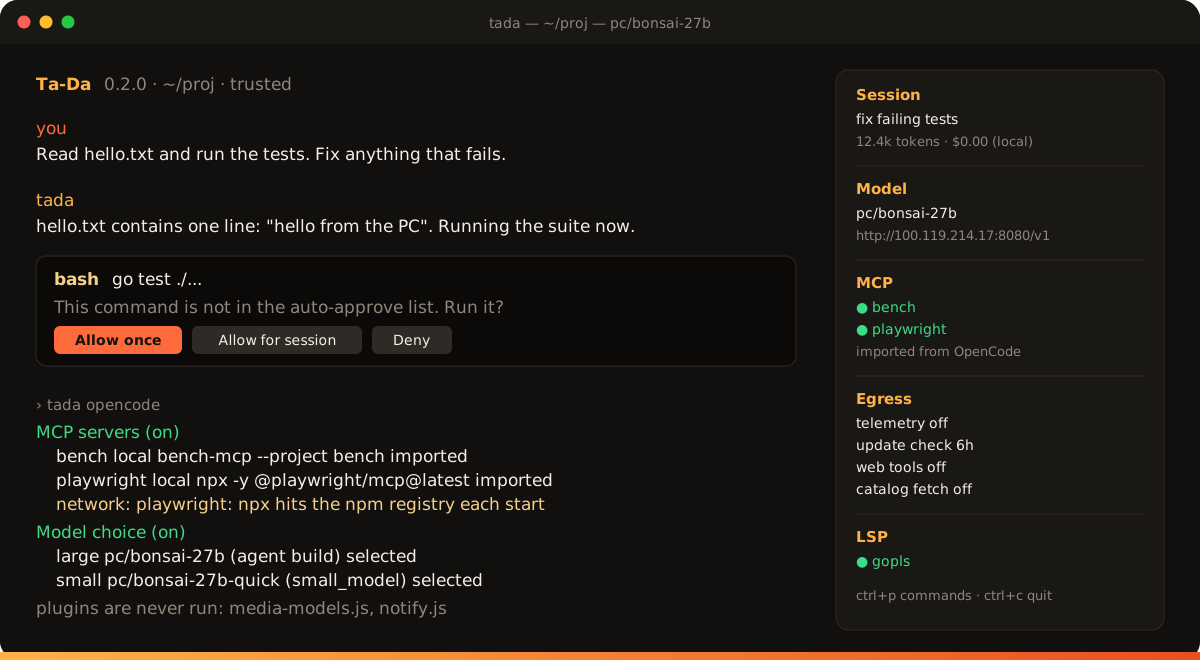
Ta-Da running in a terminal: a session with a local model, a permission prompt before a shell command, the OpenCode import report, and a sidebar showing telemetry, update checks, web tools and catalog fetches all off.
What's different

Same agent. Much shorter list of who it talks to.

Upstream Crush is excellent. This build changes what it does without asking, not how it codes. Every change is listed in the changelog.

No phone-home

PostHog telemetry, Charm's update check, the Catwalk and Hyper catalog fetches, the Hyper vendor service and the forced Termux DNS resolvers are removed, not just disabled. The provider catalog is a local file you refresh on purpose with tada update-providers.

Web tools off by default

fetch, agentic_fetch, download and sourcegraph are hidden from the model until you run option web-tools true. Even then, every request asks first. Downloads are capped and headers are redacted in logs.

Untrusted projects stay inert

A cloned repo's tada.json, tadarc and OpenCode config are ignored until you run tada trust. No MCP servers or LSPs start from a project you have not vouched for. .env files are no longer auto-loaded.

Stricter bash auto-approval

Only a single, parsed, read-only command runs without a prompt. Wrappers such as env and timeout, redirections, pipes into writes and multi-line commands always ask.

OpenCode import

MCP servers, providers, model choices, the models.dev cache, rules, skills, custom commands, tool toggles and file-edit permissions come from your OpenCode install. Read from disk only. How it works.

Reviewable releases

Every tag builds six archives and two Windows installers in a public GitHub Actions run with pinned actions, ships a SHA256SUMS.txt, and lands as a draft release that is reviewed before it is published.

Updates when you say so

tada update fetches the newest release, checks it against SHA256SUMS.txt and swaps the binary in place. Ta-Da mentions a new version once; it never downloads on its own, and the check can be turned off.

Its own look

A warm "cetla" theme, a Ta-Da wordmark and a short startup flourish (any key skips it; TADA_NO_INTRO=1 turns it off). Charm's themes are still in the picker.

OpenCode import

Already set up OpenCode? You're done.

Ta-Da reads ~/.config/opencode at startup and brings the useful parts across. Nothing is copied or rewritten, and nothing of OpenCode's runs. Plugins in particular are never executed: they are listed in the report so you know what is being skipped.

  • MCP servers, providers and your default and small model
  • The cached models.dev catalog, for providers Ta-Da doesn't already know
  • Rules, global AGENTS.md, skills and custom commands (as opencode:<name>)
  • Tool toggles, deny rules, and edit: allow as a no-prompt list inside the project
  • A network: note for MCP commands like npx -y that reach the registry on every start

Each part has an on/off switch under options.opencode, and TADA_DISABLE_OPENCODE=1 turns the whole thing off. Run tada opencode to see exactly what was read and what was skipped.

tada opencode
Config files read
  ~/.config/opencode/opencode.jsonc
  project-level config: skipped (not trusted; see `tada trust`)

MCP servers (on)
  bench       local  bench-mcp --project bench      imported
  playwright  local  npx -y @playwright/mcp@latest  imported
  network: playwright: npx contacts the npm registry
  every time it starts; add --prefer-offline

Model choice (on)
  large  pc/bonsai-27b        (agent build)  selected
  small  pc/bonsai-27b-quick  (small_model)  selected

Models catalog (on)
  cached   232 providers, 9056 models; 219 usable by Ta-Da

Credentials (off)  set options.opencode.credentials to use
                   API keys from `opencode auth login`

Commands (on)
  opencode:commit, opencode:review, opencode:simplify

Notes
  plugins are never run: media-models.js, notify.js
What it connects to

Everything that can open a socket, on one list.

Verified with a process-tree connection watcher during the fork's audit, and again on a Windows PC against a local llama-server. If a line isn't here, Ta-Da doesn't do it.

  • Model providers you configure. Chat completions, plus a GET /models discovery call against the same base URL.
  • MCP servers you configure. Local processes, HTTP or SSE endpoints, and their OAuth flows if they use one.
  • OAuth refresh for accounts you signed in with tada login.
  • Web tools, only once enabled and only after you approve each request.
  • Catalog refresh, only on request with tada update-providers.
  • Update check, unless turned off. At most every 6 hours, one request to api.github.com for this repo's latest release; downloads only when you run tada update. Off with options.update_check: false, option update-check false or TADA_NO_UPDATE_CHECK=1.
  • Nothing else. No telemetry, no crash reports, no other startup fetches.

always, to hosts you chose opt-in or can be turned off

Download

Get Ta-Da

All releases

Windows this computer

tada_<version>_Windows_x86_64_Setup.exe

Installer, x64 (most PCs)

tada_<version>_Windows_arm64_Setup.exe

Installer, ARM64

The installer needs no admin rights. It puts Ta-Da in %LOCALAPPDATA%\Programs\Ta-Da, adds tada to your PATH and the Start menu, and uninstalls from Settings → Apps. Open a new terminal afterwards and run tada in a project folder. Not code-signed: if SmartScreen appears, choose More info → Run anyway.

Portable zip, nothing installed: x64 · ARM64.

macOS this computer

tada_<version>_Darwin_arm64.tar.gz

Apple silicon

tada_<version>_Darwin_x86_64.tar.gz

Intel

Not notarized. If macOS refuses a binary you downloaded with a browser, run xattr -d com.apple.quarantine ./tada.

Linux this computer

tada_<version>_Linux_x86_64.tar.gz

x64

tada_<version>_Linux_arm64.tar.gz

ARM64

A static binary; works on any glibc or musl distro, Raspberry Pi 4/5, Graviton and Ampere.

Package managers (Homebrew, npm, AUR, Nix) install Charm's upstream Crush, not Ta-Da. Get it from the downloads above or build from source.

Checking a download

Every release includes SHA256SUMS.txt. Put it next to the archive and compare.

# macOS / Linux
shasum -a 256 -c SHA256SUMS.txt --ignore-missing

# Windows (PowerShell)
Get-FileHash tada_<version>_Windows_x86_64_Setup.exe
Select-String Windows_x86_64_Setup SHA256SUMS.txt

Build from source

Go 1.27 or newer, nothing else. Same command on every platform.

git clone https://github.com/ItsCetla/tada.git
cd tada
go build -o tada .
./tada --version
FAQ

Questions people ask.

Is this an official Charm release?

No. It is an independent fork of charmbracelet/crush. Charm is not involved and does not support it. Bugs in code that isn't fork-specific belong upstream.

Does it work with local models?

Yes. Any OpenAI- or Anthropic-compatible endpoint works, including llama-server, LM Studio, Ollama and vLLM. Set a provider with a base_url and an API key (or a {file:…} reference in OpenCode config) and pick the model. Timeouts are long enough for a cold 30k-token prompt on a 27B model.

What does tada trust actually gate?

Project-level config, project OpenCode files, project MCP servers and LSPs, and the no-prompt list for edits inside the project. Until a project is trusted, Ta-Da still works in it but uses only your global config. TADA_TRUST_PROJECT=1 trusts the current directory for one run, which is handy for scripts.

Why are the binaries unsigned?

Signing and notarizing cost money and tie a release to a person's certificate. Instead, every build runs in a public GitHub Actions workflow with pinned actions, and the checksums file lets you verify what you got. If you'd rather not trust that, go build takes about a minute.

Can I turn the web tools on?

Yes: option web-tools true inside Ta-Da, options.enable_web_tools: true in config, or TADA_ENABLE_WEB_TOOLS=1. Each fetch still asks for permission, and downloads are size-capped.

How do I update?

Run tada update (add --check to only look, or -y to skip the prompt). It downloads the release for your platform, verifies it against SHA256SUMS.txt and replaces the binary. On Windows with the installer, quit Ta-Da first, or just run the new Setup.exe; it upgrades in place.

I used this fork when it was called Crush. What happens to my setup?

On first run Ta-Da copies ~/.config/crush and ~/.local/share/crush into its own folders and still reads CRUSH_* variables, .crush/skills and .crushignore. Per-project session history in .crush/ isn't moved. The 0.2.0 Windows installer replaces the old crush.exe and its shortcuts.

What license is it under?

FSL-1.1-MIT, the same Functional Source License as upstream Crush. You may use, copy, modify and redistribute it for anything except a competing product; each version becomes MIT two years after its release.